Requesting data out of the TRE
What is allowed out (TRE data export policy)?
Individual level data are not allowed out of the TRE. Any data out requests are reviewed by the Genes & Health core team to make sure they do not contain individual level data.
Individual level exports
Users making deliberate (or several inadvertent) attempts to export individual level data will have TRE access permanently terminated.
Please keep files simple, e.g. text only (can be .txt, .csv, .tsv, etc.) or figures (e.g. .pdf, .png, .jpg). Powerpoint, Excel, Word formats are also OK.
Binary files
We cannot review binary files, nor rds, parquet, feather, arrow etc. - these will be rejected.
Warning
In code files there can sometimes be unreadable data e.g. hexadec image in .ipynb notebooks or unexpected individual level data (again especially .ipynb notebooks). These will result in download request rejection. Please check your code files are text only and for .ipynb notebooks, please select "Reset Kernel and Clear Outputs of All Cells..." from the Jupyter Notobook "Kernel" menu before saving and copying your file for an export request. For all code, please ensure the code itself does not include individual level data (e.g. a list of pseudo NHS number included for debugging purposes).
There is no problem with text files being very large.
Facilitating download approvals
To speed review of your request, please make it easier for the review system:
- single datafile types (e.g. just
pdf, not bothpdfandpng) - one huge datafile is easier than lots of datafiles
- all files in one flat folder structure not lots of subfolders
- Please
.zipor.tar.gzfiles before requesting data out
Creating a .zip or .tar.gz file
If you are trying to download multiple files, please do not make loads of per-file download requests. Rather, create a tar archive containing the requested files. If the files are large (total >10Mb), please compress the tar file.
For example, if you wanted to compress a folder into a .tar.gz file:
This says: “Create (c option) a gzip-compressed (z option) archive of my directory-of-files-to-export folder, show me what’s happening (v option), and name it (f option) backup.tar.gz.”
See the How to Tar a File in Linux: Commands, Examples & Best Practices guide for more details (external unverified link)
Summary statistics
Summary statistics (e.g. by gene, variant or disease), graphs, etc. are all usually fine.
For small numbers of individuals, we will apply inference control (as advised by the Information Commissioners Office). Specifically, counts between 1 – 5 have the individual number replaced by the text “1to5”.
!!! info "TRE data export policy for small numbers/counts of individuals" For more information, please read the TRE data export policy document{target="_blank"}
Requesting data
You can make a request to download your results by right-clicking the file and selecting "request file download" for any file in:
or
This sends an automated email to the Genes & Health team. If you have not received a response within 72h please feel free to chase us up. The team will copy the data to green_downloads (for users of your sandbox only. For small files, your data may be directly emailed (to the email address used to make the request).
Info
Please note that you can make one data out request per week.
The 'Trying to request more than 1 file to download.' error
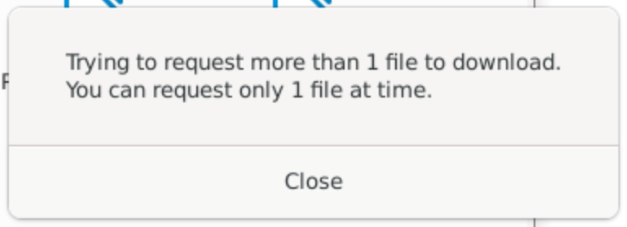
If you get the 'Trying to request more than 1 file to download.' error, there is probably a space somewhere in your file path or filename. This throws the systems so, for example:
/genesandhealth/red/Joe Blogs/my_requested_file.tar(space inJoe Bloggselement of the path) or/genesandhealth/red/Joe_Blogs/my requested file.tar(spaces inmy requested file.tar)
will cause the error, but /genesandhealth/red/Joe_Blogs/my_requested_file.tar will not.
Note
If you get this error, rename your file and/or copy it into a path with no spaces. Alternatively, tar your files/paths with spaces to a single (space-free named) file.
Tip
Enter a linux/unix file system frame of mind and, if possible, avoid spaces in paths and files: /this_will/make/things-a-lot/simpler_v0.1.txt.
Existing data
There are a number of files in library-green that are available for download. These do not need a request to be made.
Accessing TRE data from external systems/internet
Users can download data from greendownloads or library-green using linux command line gcloud storage.
Alternatively, you can use the web-interface for your Sandbox specific green-downloads bucket, you can find the link for your sandbox using the table below:
From your external system, ideally Linux server rather than laptop if you are downloading lots of data (e.g. our GWAS).
Login to gcloud with:
Login with your username@genesandhealth.qmul.ac.uk that you use for TRE access from your browser. It is likely to ask you for 2 Factor Authentication either via phone or via a website link.
From a multicore Linux server, and especially if you are trying to transfer lots of data/files
To transfer file use: